 CloseEase Blog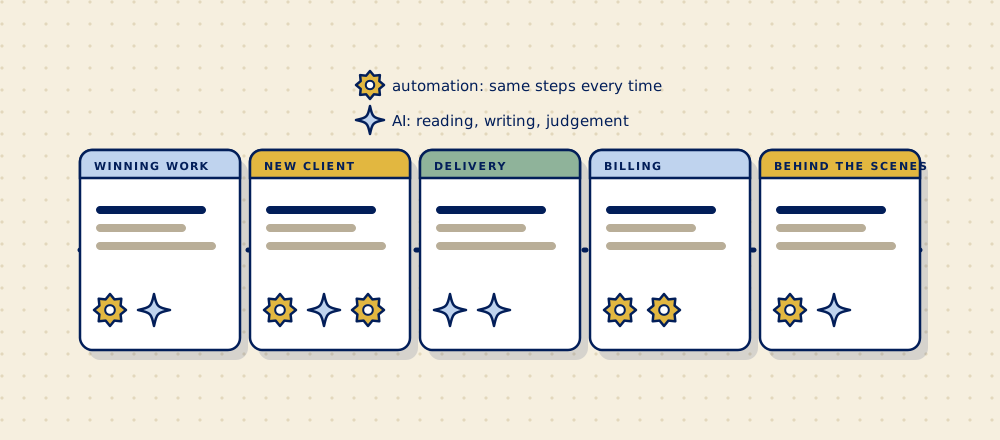
Most advice about AI for small businesses stops at "write your emails faster". That's fine, but it misses the jobs that eat most of your week: the chasing, the copying between tools, the status updates nobody enjoys writing. Here are 16 jobs inside a service firm that AI or plain automation can take off your plate, sorted by where they show up in a client's life with you.
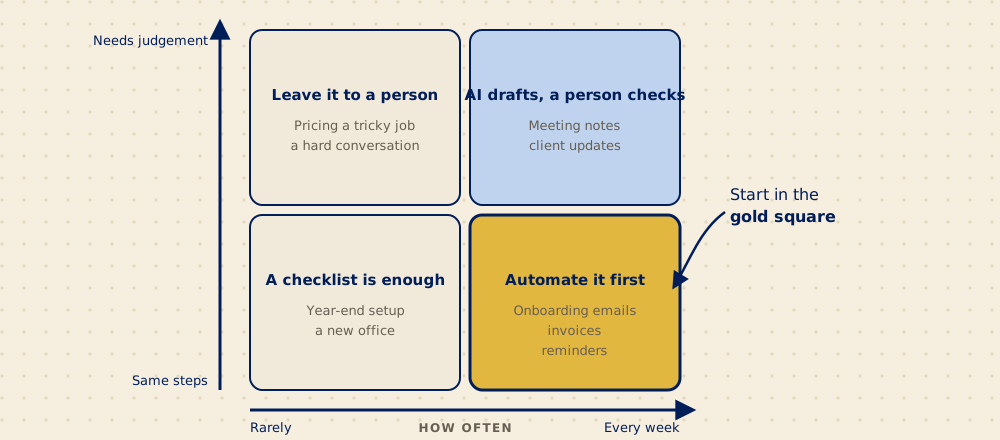
Short answerThe best uses of AI and automation in an agency, consultancy or recruiting firm are the jobs you do every week the same way: routing new enquiries, starting onboarding the moment a client signs, chasing missing files, turning meeting notes into action lists, drafting client updates, moving quotes to invoices, and keeping one client record across your tools. Use automation when the steps are always the same, AI when the job involves reading or writing, and keep a person on anything that decides about people or goes to a client unchecked.
What's the difference between automation and AI?
Automation follows rules you set: when this happens, do that. A client signs, so a welcome email goes out and a project is created. It does the same thing every time, which is exactly what you want for routine steps.
AI handles the jobs that involve reading, writing or judgement: summarising a call, spotting that a start date in the intake form doesn't match the proposal, drafting an update in plain English. It's useful when the input is messy, and it needs a person checking its work, at least at first.
Most good fixes use both. Automation moves the information, AI makes sense of it.
What can AI and automation fix when you're winning work?
| Job | What it fixes | Type |
|---|---|---|
| 1. Sort and route new enquiries | Website, email and chat enquiries land with the right person, tagged by type, with a same-day reply instead of sitting in a shared inbox | Automation, with AI to sort |
| 2. Turn call notes into a proposal draft | The first draft of a proposal or scope is written from your notes and your past proposals, so you edit instead of starting from a blank page | AI |
| 3. Follow up on quiet quotes | A friendly follow-up goes out when a quote hasn't been answered in a week, and you're told when it's been two | Automation |
What can AI and automation fix when a new client signs?
This is where most firms lose the most time, and where automation pays off fastest. (There's a full guide to what should happen between a client signing and the work starting.)
| Job | What it fixes | Type |
|---|---|---|
| 4. Start everything when a client says yes | The welcome email, the onboarding request, the shared folder, the CRM record and the project are all created the moment the proposal is signed | Automation |
| 5. Check the intake against the proposal | Details that don't match, like two different start dates, are flagged with a suggested fix before they cause trouble | AI |
| 6. Chase what's missing, and only that | The client gets one reminder listing exactly what's still outstanding, instead of a dozen emails from different people | Automation |
We built a working demo of jobs 4 to 6 with made-up firms. You can see it on our client onboarding page.
What can AI and automation fix while you deliver the work?
| Job | What it fixes | Type |
|---|---|---|
| 7. Meeting notes into actions | A recording or notes become a list of decisions and next steps, each with a name and a date, sent to the people involved | AI |
| 8. Client status updates | A weekly update is drafted from your project tracker, so someone checks and sends it in two minutes instead of writing it in twenty | AI drafts, a person sends |
| 9. Answers from your own documents | Your team asks "what did we agree on revisions for this client?" and gets the answer from your own contracts and notes, with a link to the source | AI |
| 10. Shortlists against a role brief | For recruiting firms, CVs are summarised against the brief so recruiters spend their time on the right candidates. A person makes every decision. | AI, a person decides |
What can AI and automation fix in billing?
| Job | What it fixes | Type |
|---|---|---|
| 11. Quote to invoice to reminder | An accepted quote becomes an invoice with the right details, and polite reminders go out on schedule until it's paid | Automation |
| 12. Budget warnings | You're told when a project has used 80% of its hours or budget, while there's still time to talk to the client about it | Automation |
What can AI and automation fix behind the scenes?
| Job | What it fixes | Type |
|---|---|---|
| 13. One client record across your tools | Client details are entered once and shared with your CRM, invoicing and tracker, instead of being retyped (more in why your team types the same information in three places) | Automation |
| 14. Reports that build themselves | The weekly numbers you pull by hand from three tools arrive in one place every Monday | Automation |
| 15. New staff set up on day one | Accounts, folders and an onboarding checklist are ready when a new hire starts, and switched off when someone leaves | Automation |
| 16. Search your files in plain language | "Find the last brand guidelines we got from this client" works, without knowing which folder someone saved them in | AI |
Is it worth it for a firm of 5 to 50 people?
Usually, if you start with the right job. The repetitive work is real: in Zapier's survey of workers at firms with fewer than 250 staff, people estimated 17.3 hours a week went to repetitive tasks that could be automated, and data entry was the most dreaded.1 That's a vendor survey of self-reported time, so take the number loosely. The direction is hard to argue with.
You also wouldn't be early. Statistics Canada found that 12.2% of Canadian businesses used AI to produce goods or deliver services in 2025, double the year before, and 30 to 35% in professional services, finance and information firms.2 Microsoft's survey of 300 Canadian small and medium business leaders put any use of AI at 71%, with 70% reporting better efficiency.3 The two numbers measure different things, but both say the same: firms like yours are already using it.
What shouldn't you automate?
- Decisions about people. Hiring, performance and anything similar. AI can summarise; a person decides.
- Anything that goes to a client unchecked, at first. Let AI draft and a person send until you trust it. Then decide case by case.
- The moments that build the relationship. The kickoff call, a hard conversation about scope, a thank-you that means something.
- Client information in tools you haven't vetted. Canada's privacy regulators ask organisations using generative AI to have a lawful basis for the personal information they use, be open about it, and limit sharing of sensitive or confidential information.4 In practice: know where client data goes, use business accounts with the right settings, and check your client contracts.
- A broken process. Automating a messy process gives you the same mess, faster. Fix the steps first.
How do you choose where to start?
- List the jobs your team does every week that follow the same steps.
- Circle the ones that involve copying information from one place to another, or chasing someone.
- Pick the one that touches the most clients. That's usually something in onboarding.
- Write down the steps as they happen today, before deciding on any tool.
- Start small, measure the time it saves for a month, then do the next one.
If you'd like help with that, a Find follows one workflow from start to finish, shows where AI or automation would help (and where it wouldn't), and gives you a written recommendation and a quote before anything is built.
Questions people ask
How can a small service business start using AI?
Pick one job you do every week that involves reading or writing, like meeting notes or client updates. Use AI to draft it and have a person check it. Once that works, move to jobs that connect your tools, such as starting onboarding automatically when a client signs.
Do I need AI, or is automation enough?
For many jobs, automation is enough. If the steps are always the same, like sending a welcome email when a client signs, plain automation is cheaper and more reliable. AI is worth adding when the job involves messy input, like reading notes, comparing documents or writing drafts.
What's the best first thing to automate in an agency or consultancy?
What happens when a new client signs: the welcome email, the request for information, and setting the client up in your tools. It happens with every client, it follows the same steps, and delays there are felt by the client straight away.
Is it safe to put client information into AI tools?
It can be, with care. Use business versions of tools with clear data settings, know where the information is stored, share only what the job needs, and check what your client contracts allow. Canada's privacy regulators have published principles for using generative AI responsibly.
Will AI replace staff in a small firm?
So far that's not what the data shows: Statistics Canada found nearly 90% of businesses using AI reported no change in how many people they employ. In small firms, it mostly takes the repetitive parts of a job so people spend more time on the work clients pay for.
Sources
- Zapier, "Knowledge workers' most dreaded tasks", April 2021. Survey of 1,000 US knowledge workers at businesses with fewer than 250 employees, run by OnePoll. Zapier sells automation software.
- BetaKit, "StatsCan finds AI adoption has doubled in businesses, but hasn't yet affected headcounts", June 2025, reporting Statistics Canada's Canadian Survey on Business Conditions (April to May 2025).
- Microsoft Canada, SMB Report, June 2025. Survey of 300 decision-makers at Canadian businesses with 1 to 250 employees, run by Edelman in January 2025. Microsoft sells AI tools.
- Canadian privacy regulators, principles for the responsible development and use of generative AI, December 2023.